iPhone 16e Review: Apple’s Nostalgic Masterstroke or Overpriced SE?
iPhone 16e Review: Apple’s Nostalgic Masterstroke or Overpriced SE?
When Apple announced the iPhone 16e, the internet erupted. Some called it a bold move, while others labeled it another overpriced iPhone SE. But after spending some time with the device, I’m here to tell you why the iPhone 16e might just be Apple’s most underrated release yet. Welcome to Reviewisse, where we break down the latest tech without the fluff.
Design: A Nostalgic Throwback
Let’s address the elephant in the room—the design. The iPhone 16e is unapologetically retro. From the bezels to the matte glass back, it screams nostalgia. Some might call it outdated, but Apple calls it “grip enhancers.” Yes, those bezels aren’t just for show; they’re designed to prevent accidental touches and butt dials. Genius or gimmick? You decide.
The phone comes in classic black and white, with optional cases for a pop of color. And then there’s the notch—yes, the notch is back! While most brands have moved to punch-hole displays, Apple has doubled down on the iconic design. It’s a reminder of simpler times when phones had character, and honestly, I’m here for it.
Display: Retro Yet Modern
The iPhone 16e features a 6.1-inch Super Retina XDR Pro Ultra Max display (yes, that’s the official name). The colors are vibrant, and the clarity is stunning. But here’s the kicker—it’s a 60Hz display. Before you roll your eyes, hear me out.
Apple claims that 60Hz is all you need, and they might have a point. Studies suggest our brains process information at a rate close to 60Hz, making higher refresh rates somewhat unnecessary. Plus, the 60Hz display gives the phone a retro feel while saving battery life. It’s a win-win.
Performance: Power Meets Simplicity
Under the hood, the iPhone 16e packs the latest A18 chipset. While it has fewer GPU cores than its Pro siblings, it’s still a powerhouse. The real star here is Apple Intelligence (not to be confused with AI). Features like reply suggestions, notification summaries, and an advanced Siri with ChatGPT integration make this phone smarter than ever.
Battery life is another highlight. The iPhone 16e lasts up to 6 hours longer than the iPhone 11, and with 20W charging, it’s more than enough for daily use.
Camera: Two-in-One Magic
The iPhone 16e has a single 48MP camera, but don’t let that fool you. Apple calls it a “two-in-one” camera because it can handle ultra-wide and zoom shots with ease. Want a wider shot? Step back. Need a closer shot? Move forward. It’s that simple.
The only downside? No spatial capture, which feels like a missed opportunity, especially with the Apple Vision Pro on the horizon.
Connectivity and Pricing
The iPhone 16e is the first iPhone to feature Apple’s new C1 modem, a feature even the iPhone 16 Pro Max doesn’t have. However, it lacks the ultra-wideband chip, meaning you can’t use it as a digital key for your BMW 7 Series (sorry, luxury car owners).
Now, let’s talk about the price. At ₹60,000, the iPhone 16e is positioned as a budget-friendly option. Sure, you can get the iPhone 15 or a feature-packed Android flagship at a similar price, but the 16e offers something unique—simplicity.
Final Verdict
The iPhone 16e isn’t perfect, but it’s not trying to be. It’s a phone that embraces its flaws and turns them into strengths. Whether you’re a die-hard Apple fan or a skeptic, the iPhone 16e is worth considering.
So, is it a nostalgic masterstroke or just another overpriced SE? I’ll let you decide. But one thing’s for sure—Apple has once again proven that they know how to stir the pot.
What do you think about the iPhone 16e? Let us know in the comments below. And don’t forget to visit Reviewisse for more in-depth tech reviews!
Samsung Galaxy S25 Ultra Review: An Iterative Upgrade or Worth the Hype?
In 2025, flagship smartphones from Samsung and Apple seem to have entered a comfort zone. With each passing year, innovation takes a backseat while minor upgrades dominate new releases. The Samsung Galaxy S25 Ultra is a testament to this trend. Having used the device for over a month alongside the iPhone 16 Pro Max, it's clear that while Samsung has refined certain aspects, it hasn't truly revolutionized the smartphone industry.
Minimal Upgrades: Is Samsung Playing It Safe?
The Galaxy S25 Ultra introduces only a handful of upgrades compared to its predecessor, the S24 Ultra. Much like Apple’s strategy with the iPhone 16 Pro Max, Samsung has focused on the following four aspects:
Processor Upgrade – The device runs on the new Snapdragon 8 Gen 3 Elite chip, providing a slight performance boost.
Camera Enhancement – A 50MP ultra-wide camera replaces the previous model’s 12MP sensor.
Improved Glass Protection – Samsung has implemented Gorilla Glass Armor for enhanced durability.
Software Updates – The introduction of One UI 7 brings new multitasking features and a redesigned control center.
While these changes improve the user experience, they don’t introduce groundbreaking innovations. This strategy works because Samsung and Apple continue to dominate the flagship smartphone market outside China.
Chinese Brands Leading in Innovation
Brands like Vivo, Honor, and Xiaomi are pushing the boundaries of smartphone technology, particularly in camera and battery advancements. The notion that Samsung and Apple offer the best cameras is now a myth. Chinese brands have surpassed them in many aspects. However, these brands still struggle to match Samsung’s user experience and brand value, which remains a key factor in consumer decisions.
One UI 7: A Game Changer?
Samsung’s new One UI 7 is one of the biggest highlights of the Galaxy S25 Ultra. It introduces:
A Redesigned Control Center – Borrowing inspiration from iOS but delivering a fresh and functional experience.
Improved Multitasking – Features like the navigation bar enhance ease of use.
Customization & Productivity Enhancements – The Good Lock app offers extensive personalization options.
However, Samsung has delayed rolling out One UI 7 to older Galaxy devices. As of February, only the S25 series has received the update, with other devices expected to get it by April. Additionally, security patches have been slow, with the S25 Ultra still running the December update.
AI & S-Pen Changes: Hits and Misses
Samsung has integrated several AI-driven features in the S25 Ultra, making it stand out in comparison to competitors. However, some limitations include:
AI Summary & Grammar Check – Works only on Samsung’s keyboard and browser, limiting usability.
S-Pen Downgrade – Samsung removed the battery and gyro sensor from the S-Pen, making it impossible to use for air gestures or as a remote camera shutter. The weight difference between the S24 and S25 Ultra S-Pens is negligible, making this decision seem more about cost-cutting than user experience.
Design & Display: Subtle Refinements
The Galaxy S25 Ultra is slightly lighter than its predecessor, improving ergonomics. Samsung has also switched to Grade 5 Titanium for the frame, increasing durability. However, IP68 water and dust resistance remain unchanged, lagging behind Chinese brands offering IP69 ratings.
The display has minor refinements:
Bezel Reduction – Allows for a slightly larger 6.9-inch screen.
Same Brightness & Resolution – Despite competition offering higher peak brightness, Samsung sticks with 1,400 nits.
PWM Dimming Issue – Screen flickering at low brightness persists, which may affect some users.
Performance & Battery: Solid, But Not the Best
The Snapdragon 8 Gen 3 Elite delivers noticeable improvements in performance and gaming, with better thermal management and frame rate stability. However, Samsung missed an opportunity in the battery department. Sticking with a 5,000mAh battery instead of adopting silicon-carbide batteries means competitors like OnePlus deliver longer screen-on times.
Camera Upgrades: A Marginal Improvement
The S25 Ultra’s only significant camera upgrade is the ultra-wide sensor. The main and telephoto cameras remain unchanged from the S24 Ultra. While image processing has improved, offering better contrast and dynamic range, the hardware lacks innovation.
Camera Pros:
Improved Portraits & Selfies – Better edge detection and color accuracy.
Enhanced Night Photography – Less noise and improved detail.
Smoother Video Recording – Better stabilization and glare control.
Camera Cons:
No Sensor Upgrade for 3x Zoom – Samsung continues using a 10MP lens instead of adopting its own 200MP ISOCELL HP9 sensor, which Chinese brands already leverage.
Ultra-Wide Still Handles Macros – Samsung doesn’t offer a dedicated macro camera, unlike some competitors.
Final Verdict: Should You Buy the Galaxy S25 Ultra?
The Samsung Galaxy S25 Ultra is an excellent device, but it’s only 10-15% better than the S24 Ultra. For those already using the S24 Ultra, upgrading may not be worth it. The S24 Ultra is likely to receive One UI 7 soon, narrowing the performance gap. Additionally, with upcoming Amazon sales, the S24 Ultra will be available at a much lower price, making it a more value-for-money option.
Reviewisse Final Take: If you own an older Samsung device and want the latest features, the S25 Ultra is a solid choice. However, if you’re upgrading from the S24 Ultra, you might want to wait or consider a price drop before making the switch.
For more in-depth comparisons and the latest tech insights, stay tuned to Reviewisse!
Motorola Edge 40: A Premium Smartphone Experience Under Rs. 30,000
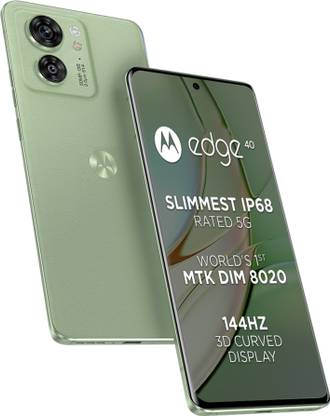
In the highly competitive market of smartphones under 30,000 rupees, the Motorola Edge 40 stands out as a device that combines premium design with flagship-level features. With its sleek aesthetics, immersive display, powerful performance, and improved camera capabilities, the Edge 40 offers an enticing option for consumers seeking a premium smartphone experience at an affordable price.
Detailed Review of Motorola Edge 40
Top Pick
Premium Smartphone
8 GB RAM, 256 GB ROM | 16.64 cm (6.55 inch) Full HD+ 3D Curved Display | 50MP + 13MP, 32MP Front Camera | 4400 mAh Battery with 68 W TurboPower charger | Dimensity 8020 Processor
Buy on Amazon
Motorola has launched the new Edge 40 and this is a phone that brings flagship features like wireless charging, IP68 rating and more while bringing in good specs all around. So, is the Moto Edge 40 a good option under 30K? Read out the detailed Review of Motorola Edge 40
Design and Build Quality:
The Motorola Edge 40 is available in two different finishes: one with a PMMA acrylic glass-like back and the other with a premium leather finish. The leather version, which comes in green but is also available in black, exudes a high-end look and feel. Additionally, the phone boasts an aluminum frame, further enhancing its premium aesthetics. With a slim profile of just 7.49 millimeters and weighing only 167 grams, it is both sleek and lightweight, surpassing the slimness and weight of other popular phones such as the Nothing Phone 1 and the Poco F5.
Display:
The front of the phone is equally impressive, featuring a 3D curved AMOLED display with symmetrical bezels that add to its overall appeal. Motorola has not compromised on the display quality, as it offers an OLED panel with a super-fast 144Hz refresh rate, 1200 nits of brightness, 100% DCI-P3 color gamut coverage, and HDR support. The result is a visually stunning and immersive display that excels in smoothness, vibrancy, and brightness. Despite concerns about accidental touches on curved screens, this phone manages to provide a premium experience without sacrificing usability.
Flagship-Level Features:
The standout feature of the Motorola Edge 40 is the inclusion of flagship-level attributes typically reserved for higher-priced devices. It boasts an IP68 rating for water and dust resistance, a feature commonly found only in flagship phones. This means that users can confidently use the phone underwater or in wet conditions without worry. Furthermore, the phone supports wireless charging, offering 15-watt wireless charging support, unlike some other phones in this price range that provide slower wireless charging options.
Performance
Under the hood, the Motorola Edge 40 packs a punch with the new MediaTek Dimensity 800U processor, a notable upgrade from its predecessor, the Edge 30. Paired with 8GB LPDDR4X RAM and 256GB UFS 3.1 storage, the Dimensity 800U delivers stable performance without any noticeable throttling, heating, or lag, even during intensive tasks and gaming. In fact, games like PUBG New State run smoothly at 90 FPS, showcasing the device's capability to handle demanding applications effortlessly. While the Dimensity 800U falls short of the power offered by the Snapdragon 778G Plus found in some competitors' phones, it still provides excellent performance in its price segment.
Security and Audio Features:
Motorola has integrated an in-display fingerprint scanner for convenient and secure unlocking of the phone. Additionally, the device features stereo speakers with support for Dolby Atmos, ensuring a rich and immersive audio experience. It is worth mentioning that the phone lacks a headphone jack and a microSD card slot, which might be disappointing for some users.
Camera Capabilities:
In terms of cameras, Motorola phones have often been a work in progress, but the Edge 40 brings significant improvements. It sports a dual-camera setup, without unnecessary depth or macro lenses, focusing on essentials. The main camera is an impressive 50-megapixel sensor with a super-wide F/1.4 aperture, offering brighter low-light photos and shallower depth of field. Low-light shots from the Edge 40 showcase bright and sharp images with commendable detail. Daytime photos also exhibit good color reproduction, fine details, and excellent dynamic range. The 13-megapixel ultra-wide camera doubles as a depth sensor and a macro sensor, providing versatility in capturing different types of shots.
Optical image stabilization (OIS) is present in the Edge 40, along with Horizon Lock Spot, a feature usually found in flagship devices. This feature ensures stable video recording even when the phone is flipped 360 degrees. Additionally, the phone offers various focal length options for portrait shots, including 24mm, 35mm, and 50mm. The selfie camera boasts a 32-megapixel sensor and supports 4K recording, delivering satisfactory results for self-portraits.
Software and User Experience:
The Motorola Edge 40 runs on Android 13, providing a clean and ad-free user experience. Motorola has minimized bloatware, and the only additional feature is the Moto Hub widget, which offers news and deals. One notable feature is "Ready For," which allows users to connect their phone to a TV or monitor and enjoy a PC-like experience. The device also includes features like "More Secure" and "Family Spaces," providing useful functionalities for enhanced security and family usage.
Motorola has made promises regarding software updates, pledging two major OS updates and three years of security patches. While Motorola's update history has been criticized for being slow in the past, the company has expressed its commitment to improving in this aspect.
Battery Life and Charging:
The battery life of the Motorola Edge 40 has received an upgrade compared to its predecessor. The phone comes with a larger battery capacity and supports 68W TurboPower fast charging via USB-C. Charging times are impressive, with the phone reaching 50% in approximately 17 minutes and fully charging in 50 minutes. During our testing, the battery life proved to be satisfactory, offering around five and a half hours of screen-on time with heavy usage.
Connectivity:
Connectivity-wise, the Edge 40 supports all the necessary 5G bands, ensuring compatibility with future network technologies. It also features Wi-Fi 6, Bluetooth 5.2, but does not include NFC functionality.
Pricing and Value:
Priced at Rs. 22,999, the Motorola Edge 40 provides excellent value for its features and specifications. Pre-booking offers may further reduce the price, making it an even more enticing option. While it may not be the most powerful phone in its segment, it compensates with a premium design, lightweight build, flagship features, solid performance, commendable camera capabilities, and a well-optimized user interface.
In conclusion, the Motorola Edge 40 presents itself as a well-balanced smartphone that brings exciting flagship features to the affordable price range. With its attractive design, impressive display, reliable performance, and notable camera improvements, the Edge 40 is a compelling option for consumers seeking a premium smartphone experience without breaking the bank.
What are your thoughts on the new Motorola Edge 40 priced under Rs. 30,000? How do you think it compares to the competition? Share your opinions in the comments below.ASUS ROG Strix G18: Unleashing Unmatched Gaming Power at an Affordable Price
ASUS has once again delivered a remarkable gaming laptop with the introduction of the ASUS ROG Strix G18. Packed with powerful components and offered at an attractive price point, this laptop stands out in the market. In this article, we will delve into the impressive specifications, benchmark results, gaming performance, design features, and pricing of the ASUS ROG Strix G18, showcasing why it is an excellent choice for avid gamers seeking top-notch performance.
Top Pick
Gaming Laptop
90WHr Battery, Intel Core i9-13980HX 13th Gen, 18" QHD+ 240Hz/3ms, 8GB RTX 4070, Gaming Laptop, 16GB/1TB SSD
Buy on Amazon
Powerful Specifications for Unparalleled Performance:
The ASUS ROG Strix G18 boasts a high-end configuration, featuring the top-of-the-line Intel Core i9 3980HX processor. With an astounding 24 cores, 32 threads, and a clock speed of 5.6 GHz, this CPU guarantees superior performance. Additionally, it operates at a power-efficient 140-watt TDP on turbo, ensuring optimal power utilization.
Accompanying the formidable CPU is the RTX 4070 variant graphics card, equipped with 8GB of fast GDDR6 VRAM and 140 watts of TGP. The RTX 40 series brings forth cutting-edge features for an enhanced gaming experience. Complementing these impressive components is the inclusion of 16GB LPDDR5 dual-channel RAM, a fast 1TB Gen 4 SSD, and support for RAID 0, enabling enthusiasts to achieve lightning-fast data transfer speeds. The laptop also provides ample room for memory expansion, with two RAM slots supporting up to 64GB RAM, along with two Gen 4 sec slots.
Immersive Gaming Experience ASUS ROG Strix G18:
The ASUS ROG Strix G18's display is designed to captivate gamers. Featuring the exclusive Asus Nebula display, a distinguished standard reserved for top-tier displays, it ensures a visually stunning experience. The massive 18-inch screen boasts QHD+ resolution, a swift 240Hz refresh rate, and a rapid 3ms response time. With a peak brightness of 500 nits, gaming visuals are rendered with remarkable clarity, making it a perfect choice for gaming enthusiasts.
Impressive Benchmarks:
The ASUS ROG Strix G18 delivers outstanding benchmark results. The Intel Core i9 HX CPU achieves a multi-core score of 27,000 in Cinebench, closely rivaling the flagship Scar 18. In the Geekbench multi-core test, it reaches an impressive score of 15,000. As for the RTX 4070 GPU, it excels in the 3D Mark Timespy benchmark, scoring 12,000. These benchmarks highlight the laptop's exceptional performance potential.
ASUS ROG Strix G18 Unmatched Gaming Performance:
The ASUS ROG Strix G18 truly shines when it comes to gaming performance. In demanding games like Cyberpunk, the laptop delivers decent FPS ranging from 40 to 50 with Ray Tracing set to Ultra and a resolution of 2.8. The addition of AI frame generation, paired with the power of the 40 series GPU, significantly enhances FPS, with numbers reaching around 70 FPS in high settings. In games like Hogwarts Legacy and Apex Legends, players can enjoy smooth gameplay with impressive frame rates exceeding 140 FPS. The 240Hz display and low response times further contribute to a seamless gaming experience.
Aesthetics and Cooling System:
The ASUS ROG Strix G18 boasts an attractive gaming design, featuring the iconic ROG logo on the back, a stylish slash pattern extending around the keyboard and palm rest, and a captivating four-zone RGB lighting system. The laptop's construction is solid, with no flex, and the lid effortlessly opens with one hand. To maintain optimal thermals, the laptop incorporates three fans, six heat pipes, and a massive exhaust on the back, along with exhaust vents on the sides. This robust cooling system ensures that the laptop remains cool even during intense gaming sessions. The utilization of a conductor not thermal compound, similar to the flagship Scar 18, further enhances thermal management.
User-Friendly Features and Customization:
The ASUS ROG Strix G18 provides a user-friendly experience with its array of features. The full-sized keyboard includes well-spaced keys with a comfortable 2mm travel distance and n-key rollover. The trackpad is large, smooth, and highly responsive, adding to the overall convenience. The laptop's build quality is impressive, allowing the lid to be opened easily with one hand while maintaining its structural integrity.
Connectivity and Audio:
With regards to connectivity options, the ASUS ROG Strix G18 offers ample ports to cater to various needs. The right side features two USB-A ports for connecting accessories, while the left side houses a LAN port, HDMI 2.1, Thunderbolt 4, a USB-C port with PD charging and DisplayPort support, and an audio jack. Dual speakers with a smart amp and Dolby Atmos support deliver immersive and high-quality audio, providing an enhanced gaming and multimedia experience.
ASUS ROG Strix G18 Battery Life and Charging:
Equipped with a substantial 90Wh battery, the ASUS ROG Strix G18 offers approximately 4 hours of battery life, which is commendable considering the laptop's powerful specifications. Additionally, the included 280W adapter enables fast charging, reaching 50% charge in just 30 minutes. Moreover, a 100W PD charging port adds to the laptop's versatility.
Competitive Pricing:
The ASUS ROG Strix G18 is attractively priced, starting at just Rs. 1,69,990, making it an affordable option for gamers seeking top-tier performance. The variant we reviewed comes at a slightly higher price of Rs. 2,19,990, but the exceptional performance and premium features make it a worthwhile investment for avid gamers.
Conclusion:
In conclusion, the ASUS ROG Strix G18 sets a new standard for gaming laptops with its exceptional performance, striking design, and competitive pricing. Its powerful configuration, including the Intel Core i9 processor and RTX 4070 GPU, ensures outstanding gaming experiences across a variety of titles. The impressive benchmarks and smooth gameplay on the 18-inch display further solidify its position as a top contender in the gaming laptop market.
With user-friendly features, robust cooling, and customizable lighting, the ASUS ROG Strix G18 offers an immersive and enjoyable gaming experience. Whether you're a casual gamer or a hardcore enthusiast, this laptop is sure to meet and exceed your expectations, delivering unparalleled gaming power at an affordable price.
Nothing Ear (2) vs. AirPods Pro: Which is Better?
Nothing Ear (2) vs. AirPods Pro: Which is Better?
The wireless earbuds market has grown rapidly over the years with Apple's AirPods leading the pack. AirPods are known for their great sound quality, noise cancellation, transparency mode, and battery life. However, there are always new players in the market, such as Nothing Ear (2), promising the same features as AirPods Pro at almost half the price.
Nothing Ear (2) was released, and after spending almost a month with the product, it was tested with all sorts of smartphones and laptops with all sorts of media files to come up with a fair assessment. In this article, we will discuss how Nothing Ear (2) fares against AirPods Pro in terms of design, fit and comfort, controls, connectivity, and noise cancellation.
Nothing Ear (2) vs. AirPods Pro
Design
Nothing Ear (2) has a unique design, just like the previous Nothing products. While it doesn't have those fancy LED lights, it still looks striking and visually iconic. The Ear (2) has a distinctive kind of charm, but it has a lot of AirPods resemblance. The package comes with three silicon ear tips in the box, and the default medium size ones fit comfortably in most ears.The earbuds also passed the ear tip fit test in the Nothing X app. However, just like fingerprints, ear shapes are fundamentally different, and some people may find it challenging to put them on, including the author. The Ear (2) uses pinch control, which was not as elegant as expected, and would frequently reposition in the ear.
Fit and Comfort
Fit and comfort are essential when it comes to wireless earbuds. While a bunch of friends and colleagues found the Ear (2) to be comfortable, some found it challenging to put on. The Ear (2) is not likely to fall off the ear, but readjustment is often necessary. AirPods Pro 2 is still better in terms of fit and comfort, according to the author.Controls
Nothing Ear (2) has switched from touch to pinch control, which is not as elegant as the author hoped. Every time the author interacted with these earbuds, it would simply reposition in the ear. However, Nothing Ear (2) lets users customize the controls easily, and it has some unique features such as adjusting volume levels directly from the earbuds, making it more convenient.Connectivity
The Nothing Ear (2) features the latest Bluetooth 5.3 standard, along with Google's fast pair and Microsoft Swift pair support. That means Ear (2) is much easier to pair and connect with all sorts of devices, be it Android smartphones, tablets, or Windows PCS. Ear (2) has dual connection feature that lets users connect the earbuds with two devices at a time and switch between audio sources without having to meddle with the whole pairing and unpairing process every time.Noise Cancellation
The Nothing Ear (2) promises to cancel up to 40 decibels of ambient noise, which is commendable for its price. The AirPods Pro's noise cancellation is some of the best in the business, but Ear (2) does a fantastic job of canceling out noise. Ear (2) is great at getting rid of consistent low frequency sounds, but AirPods Pro still sounds quieter to the ears for low pit sounds or high-pitched ones like a car horn.The earbuds can also dynamically adjust ANC settings under the Adaptive profile, but the author found it to be rather counterproductive. It often failed to determine the surrounding noise level accurately to make any meaningful changes to the noise cancellation level.
Conclusion:
Nothing Ear (1) is an excellent alternative to AirPods Pro, offering similar features at a more affordable price point. The design and build quality are top-notch, and the sound quality is impressive. The transparency mode and active noise cancellation work well, and the battery life is decent. However, the touch controls can be a bit finicky, and the lack of wireless charging may be a drawback for some users. Overall, if you're looking for a high-quality pair of true wireless earbuds that won't break the bank, the Nothing Ear (1) is definitely worth considering.OnePlus Pad Review: The Most Powerful Tablet Under 40,000 Rupees
OnePlus Pad Review: The Most Powerful Tablet Under 40,000 Rupees
OnePlus has launched its first-ever tablet, the OnePlus Pad, which is currently one of the most powerful tablets available under 40,000 rupees. In this review, we will discuss the features and specifications of this tablet, as well as the user experience and ecosystem features. Additionally, we will also take a look at the new accessories that come with the OnePlus Pad.
Buy Now - OnePlus Pad
OnePlus Pad Review
Build Quality of OnePlus Pad
The OnePlus Pad comes in an elegant and slim design, measuring only 6.5 millimeters in thickness and weighing 552 grams, which is fairly lightweight considering the 11.6-inch display size. The tablet is available only in the screen shade color, and it has a metal body that stretches from the frame to the back. The front of the tablet features narrow bezels, which give it a sleek and modern look.
One downside of the OnePlus Pad's design is that it's a fingerprint magnet. Also, there is some screen wobbling in the corners when the display is used on a table. Thus, if you're going to use this tablet for drawing, you might want to consider getting a case.
The frame of the OnePlus Pad has a USB-C 2.0 port on the bottom, metal connectors for the keyboard on the left, and the OnePlus stylus connector and charger on the right. On the top right side of the frame, you'll find the power button and volume rocker in portrait orientation. It's disappointing to note that the tablet does not come with a fingerprint scanner, haptics, headphone jack, or MicroSD slot. The OnePlus Pad is available only in Wi-Fi and lacks LTE.
Camera and Audio
The tablet features a 13-megapixel camera on the back and an 8-megapixel wide camera on the front with a limelight feature similar to center stage. The OnePlus Pad is equipped with quad speakers with Dolby Atmos support, which produce loud and crisp sound with a bit of bass. The device can also automatically switch between left and right audio channels, depending on the screen orientation.
Display
The display is one of the standout features of the OnePlus Pad, with high resolution and sharpness. The screen is an IPS LCD, but it has punchy colors and a high contrast ratio that's impressive for an LCD. The screen's brightness is also good, which makes it ideal for multimedia use. The OnePlus Pad supports Dolby Vision, but it's worth noting that Netflix doesn't show HDR capabilities at the moment. The screen's touch response is excellent, and the high refresh rate (up to 144Hz) makes the device very responsive, especially for gaming.
Performance
In terms of performance, the OnePlus Pad is very powerful and features MediaTek's Dimensity 9000 processor, a flagship chip from last year. The device also comes with faster RAM and storage, making it ideal for multitasking and gaming. The tablet scores well in benchmark tests and doesn't have any throttling issues. In real-world usage, games run smoothly on high graphics settings and look fantastic on the big display. The user interface is also smooth and fast, even when running apps in split-screen mode, making it an efficient tablet for high-end usage.
OS and UI of the OnePlus Pad
The OnePlus Pad comes with Oxygen OS 13.1 on top of Android 11. While the UI is excellent for multitasking, we wish OnePlus had gone for the UI that Google introduced with Android 12. The tablet has several multitasking gestures, including swiping with two fingers from the top to put an app into split-screen and dragging and dropping apps from the sidebar to activate it. Some apps have a dual-pane UI, and the notification center displays quick settings on the left and notifications on the right.
Conclusion
In conclusion, the OnePlus Pad is an impressive Android tablet with outstanding features and specifications. While it lacks the support for 5G connectivity, it still offers excellent value for money compared to other premium tablets in the market. Its display, processor, and battery life are among the best in its class, making it a compelling option for anyone in the market for a new tablet.
Additionally, the OxygenOS provides a smooth and intuitive user experience, and the partnership with Netflix and Amazon Prime Video ensures that users can enjoy their favorite content in high definition.
Overall, the OnePlus Pad is a great choice for anyone looking for a high-performance Android tablet at a reasonable price point.
Xiaomi 13 Pro Review: A True Flagship Killer or Not?
Xiaomi 13 Pro Review: Can it Compete with the Best Flagship Phones on the Market?
Check out the Latest Xiaomi 13 Pro 5G
Xiaomi has been primarily known for its value-for-money Redmi series, but the Chinese tech giant has been making flagship phones for over a decade now. Their flagship phones, however, have never been competitive enough to challenge the likes of Samsung and Apple iPhones. That is until the past couple of years. Xiaomi has been investing heavily in research and development to bring a true flagship phone to the market.
This year, Xiaomi has launched the Xiaomi 13 Pro, the company's most expensive phone to date. Priced at 80,000 rupees in India, it is quite competitively priced, especially with the Bank discounts available, bringing the price down to as low as 70,000 rupees. In this review, we will be comparing it with one of the author's daily drivers, the Samsung Galaxy S23 Plus, to see if Xiaomi has finally produced a true flagship killer.
Design of Xaomi 13 Pro
The Xiaomi 13 Pro looks clean, nice, and premium, especially in the shiny white color variant. The phone comes with Gorilla Glass vectors protection up front and scratch-resistant ceramic glass on the back, which adds to the phone's robust build quality. The aluminum frames also provide a high-quality feel. However, the phone feels very heavy due to the uneven weight distribution, making it difficult to hold and type with one hand. The S23 Plus, on the other hand, is much lighter and has a nice grip, making it easier to hold.
Xiaomi has included an official IP68 rating on the 13 Pro, making it the only other Xiaomi flagship phone in the global market with IP68 certification, apart from the 2021 Mi 11 Ultra. The side buttons are also conveniently placed, providing good tactile feedback.
Display of Xaomi 13 Pro
The Xiaomi 13 Pro has a high-quality Samsung-made E6 AMOLED screen. It has everything from AQHD resolution to LTPS adaptive refresh rate and 10-bit color depth. The display gets quite bright and is comfortable to read even outdoors on a sunny day or during nighttime. The colors coming out of this display are also noteworthy, with support for HDR10+, Dolby Vision, and 120Hz. The stereo speakers also get quite loud, with good treble and bass.
The only downside to the display is the curved sides. Despite customizing the touch setting to a small area, there are still some accidental touches here and there. The overall touch responsiveness of the screen, however, is top-notch, and the phone has an excellent set of vibration motors, making the haptics great.
Xiaomi 13 Pro Performance
The Xiaomi 13 Pro comes with a Snapdragon 8 Gen 2 chip. Although it has a vapor cooling solution, the phone still gets warm when charging, recording videos, or using mobile data. The phone does not overheat or throttle, but it does get warm. In comparison, the Snapdragon chip on the S23 Plus is better optimized.
Xiaomi 13 Pro Operating System
The Xiaomi 13 Pro comes with the latest MIUI 14 update. The memory management is great, and there are tons of customization options to play with. The always-on display implementation is also noteworthy. However, the one-hand usage could be better, and the overall UI/UX could improve as well. The fingerprint sensor is placed in the Goldilocks zone, and the phone could benefit from an Ultrasonic sensor instead of the optical one.
Camera of Xiaomi 13 Pro
One of the biggest selling points of the Xiaomi 13 Pro is its camera setup. It features a quad-camera array with a 50-megapixel primary sensor, a 13-megapixel ultra-wide lens, and two telephoto lenses with 3x and 10x optical zoom capabilities. Overall, I was quite impressed with the camera's performance. In daylight conditions, the pictures were sharp, detailed, and had accurate colors. The 10x optical zoom worked quite well, and the ultra-wide lens was also quite good.
The camera also features a variety of shooting modes and features, including night mode, macro mode, and portrait mode. However, the night mode could be better, as it tends to overexpose bright lights and can produce images that look artificial. The portrait mode, on the other hand, produced some stunning images with a nice bokeh effect.
Xiaomi 13 Pro Battery Life
Finally, let's talk about battery life. The Xiaomi 13 Pro comes with a 4,500mAh battery, which is quite good. With moderate usage, the phone easily lasted me a day and a half on a single charge. It also supports fast charging and wireless charging, which is a nice touch.
Conclusion
In conclusion, the Xiaomi 13 Pro is an impressive flagship phone that offers great value for money. It has a premium design, an excellent display, a powerful processor, a versatile camera setup, and great battery life. However, it is not perfect, and there are a few areas where it could improve, such as its weight distribution, UI, and night mode photography. Overall, if you're looking for a flagship phone that won't break the bank, the Xiaomi 13 Pro is definitely worth considering.